Full is the default take
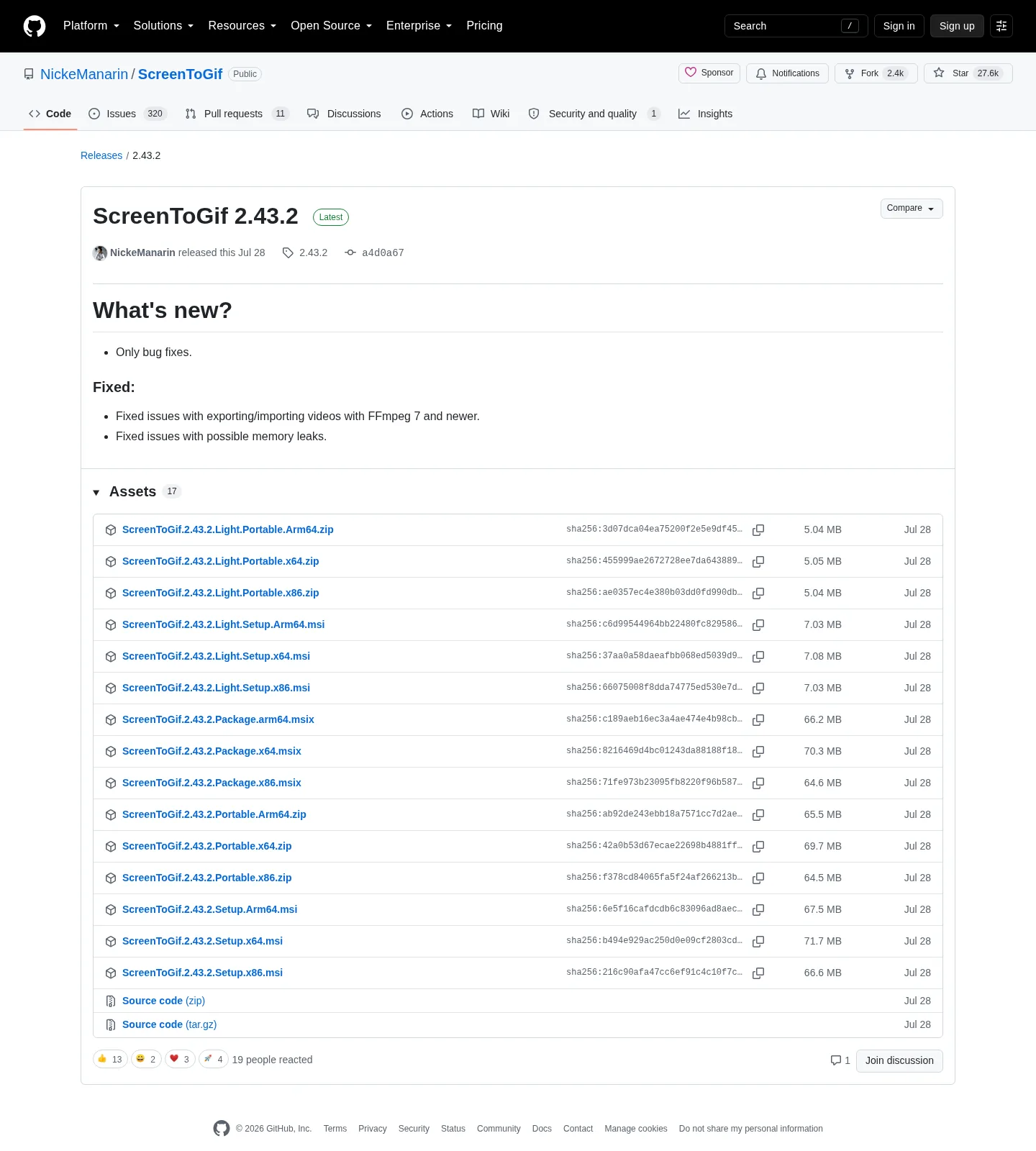
ScreenToGif publishes full and light files on the same GitHub tag. Full setup MSI is the default Windows x64 take. Winget wraps that full MSI for id NickeManarin.ScreenToGif. Light setup and light portable are official, not fan builds. Full is not a paid edition. License is MS-PL either way.
winget install -e --id NickeManarin.ScreenToGifRelated: portable or setup, gif maker releases, install on Windows, how to install winget.
What light actually omits
Maintainer notes on the repo say the light version does not have .NET along its binaries, meaning you install the runtime separately. Earlier Windows builds could lean on a framework that already sat on the PC. Current README requires .NET 9 Desktop Runtime or above. Light users must have that runtime. Full users should still expect the same README rule if the window never opens.
Do not treat light as a stripped recorder that loses webcam or sketchboard. Capture modes stay screen, webcam, and sketchboard. Export stays gif, apng, video, psd, and png. Light is about how the runtime is delivered, not about deleting features.
Filename patterns on the current tag
| Asset | Pattern | Default? | Runtime note |
|---|---|---|---|
| Full setup MSI | ScreenToGif.*.Setup.{arch}.msi | Yes for daily PCs | Winget wraps the full MSI |
| Full portable zip | ScreenToGif.*.Portable.{arch}.zip | If you want a folder | README still wants the desktop runtime |
| Light setup MSI | ScreenToGif.*.Light.Setup.{arch}.msi | No | Omits bundled .NET bits |
| Light portable zip | ScreenToGif.*.Light.Portable.{arch}.zip | No | Same light rule |
| MSIX | ScreenToGif.*.Package.{arch}.msix | Optional | Store-style package on the tag |
| Architectures | x64, x86, Arm64 | x64 on most desktops | Match the runtime too |
| Winget | NickeManarin.ScreenToGif | Full setup | Not the light zip |
| License | MS-PL | Both | LICENSE.txt on master |
Never pin a number from a screenshot. Say the current release. Releases list: gif maker releases. Safe fetch: download safely. GitHub: open source gif maker on GitHub.
When to take light anyway
Take light when the PC already has .NET 9 Desktop Runtime or above, you want a smaller download, and you are fine selecting the light name on purpose. Take light portable when you also want a folder instead of an MSI. Do not take light because a blog called it “lite freeware.” It is an official ScreenToGif asset.
Take full when you want the file winget already maps, when you are installing for someone else, or when you do not want to think about bundled bits. Machine-scope WiX MSI is what microsoft/winget-pkgs records.
MSIX sits beside both. Take it when you want the store-style package from GitHub rather than from listing 9N3SQK8PDS8G. Chocolatey package screentogif is supporting. Pick one door.
After you pick light or full
Launch, pick screen, webcam, or sketchboard, record a throwaway clip, export a gif. Webcam: webcam guide. Record: record on Windows. Export: export gif, apng, video. FFmpeg is separate from light versus full: FFmpeg guide. Video still needs ffmpeg.exe.
Windows cluster: open source gif maker on Windows. This computer: gif maker on Windows. Safety: is this gif maker safe. App Installer: Microsoft App Installer. Product home: screentogif.com. License: MS-PL. Issues: ScreenToGif issues. Wiki: ScreenToGif wiki.
Extra copies, wrappers, and other tools
Do not stack full MSI, light portable, and Store on one PC. Uninstall extras in Settings > Apps. Skip Softonic and CNET. Browser encoders are not a light SKU: vs EZGIF, switch from browser gif tools, move off web encoders. ShareX and LICEcap are other products: vs ShareX, vs LICEcap. Resize: gif resizer. Convert: gif converter. Make: make a gif. Home: gif maker. Guides: guides.
The README does not list an Android installer or a Mac package. Kap is a macOS recorder. Light and full are Windows GitHub assets only.
Choose steps:
- Open NickeManarin/ScreenToGif releases, not a mirror that wraps the name.
- Take the full x64 setup MSI, or install with winget, when you want the default file.
- Use light setup or light portable when you want the smaller official pair and you will install the desktop runtime yourself.
- Pick x64, x86, or Arm64 names and install .NET 9 Desktop Runtime or above from Microsoft.
Runtime from Microsoft, not a helper farm
Light files expect .NET 9 Desktop Runtime or above already on the PC. Install the Desktop Runtime pack, not the ASP.NET hosting pack. Arm64 Windows wants the Arm64 runtime and the Arm64 Light file. Mixing those two is how a launch never shows a window.
Full setup avoids that extra step because the payload carries the runtime. That is why the full MSI is the default take here, and why winget maps it. Update through the same door: winget upgrade -e --id NickeManarin.ScreenToGif for a winget copy, or a new MSI from GitHub.
License and extra copies
ScreenToGif is Microsoft Public License (Ms-PL). No account is required. Light versus full only changes whether .NET 9 Desktop Runtime is bundled. Capture modes and export types stay the same: screen, webcam, sketchboard; gif, APNG, video, project, PNG frames.
Keep one official copy. Do not stack Light portable, full MSI, Store MSIX, and an extra Desktop exe. Uninstall extras from Windows Settings > Apps. Skip Softonic and CNET. Safe download: download a gif maker safely. Releases: gif maker releases. Source: gif maker on GitHub.
Microsoft Store product id 9N3SQK8PDS8G is a supporting README path, not a Light chooser. Chocolatey is listed; no invented choco command. Current release notes mention FFmpeg 7 for video import and export on both Light and full.
There is no Mac installer on the ScreenToGif tag and no Android installer. LICEcap publishes a Mac build on Cockos. Kap is a separate macOS recorder. Phone video still copies to Windows.
Issues: NickeManarin/ScreenToGif issues. Wiki: ScreenToGif wiki. License: LICENSE.txt. Winget: how to install winget. Home: gif maker home. More notes: guides.
Frequently asked questions
What is light versus full for this gif maker?
Full is the default Windows setup, including the MSI winget wraps. Light is a smaller official pair that omits bundled .NET bits. Both sit on the current GitHub tag. Guide: portable or setup.
Should I install the full gif maker MSI?
Yes, for a normal desktop. Take ScreenToGif.*.Setup.x64.msi or winget id NickeManarin.ScreenToGif. Light is the smaller official option when you already manage the desktop runtime.
Does light still need .NET 9 Desktop Runtime?
Yes. The README requires .NET 9 Desktop Runtime or above for ScreenToGif. Light makes that obvious because it does not bundle the runtime. Get it from Microsoft.
Does winget install the light gif maker?
No. microsoft/winget-pkgs points at the full setup MSI for id NickeManarin.ScreenToGif. Light files are GitHub assets on the same tag. Install: install on Windows.
Is light an unofficial gif maker build?
No. Light setup and light portable are official names on GitHub Releases. Full is not a paid SKU. License is MS-PL for both. Releases: gif maker releases.