Setup MSI versus portable zip
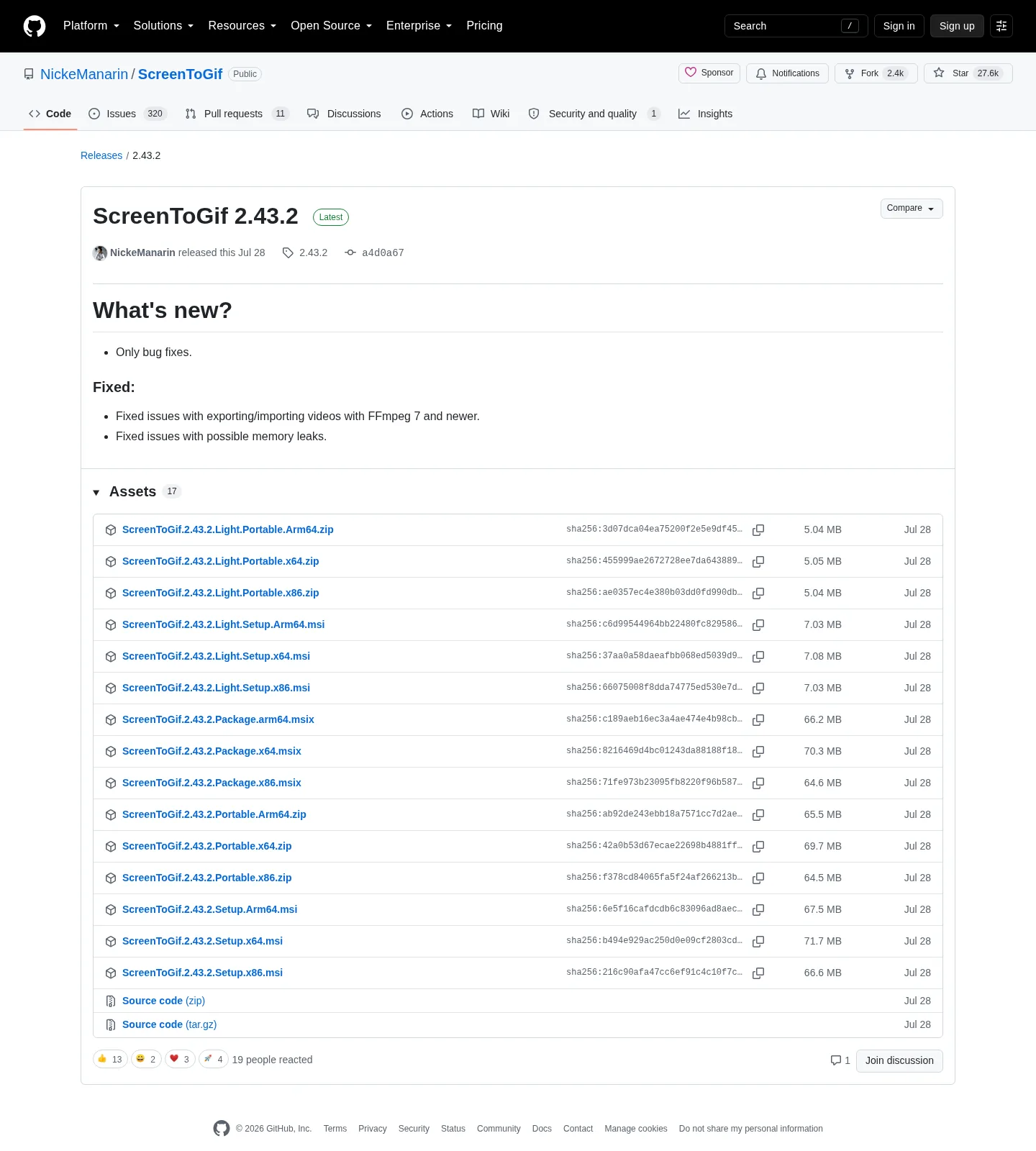
ScreenToGif ships Windows payloads on GitHub Releases: a full setup MSI, a portable zip, light setup, light portable, and an MSIX package. Names follow ScreenToGif.*.Setup.{x64|x86|Arm64}.msi and ScreenToGif.*.Portable.{x64|x86|Arm64}.zip. Public copy still says the current release. The filename carries a tag that the site injects elsewhere.
Winget does not install the zip. It wraps the full setup for id NickeManarin.ScreenToGif:
winget install -e --id NickeManarin.ScreenToGifRelated: install on Windows, gif maker releases, gif maker for this computer, and how to install winget.
When the setup MSI is the right file
Choose the x64 setup when you want Windows to place ScreenToGif on the machine and you are fine with Settings > Apps for removal. Winget-pkgs records WiX type, machine scope, and GitHub MSI URLs. After install, .NET 9 Desktop Runtime or above must be present or the window will not draw. Get that runtime from Microsoft.
Setup fits a single PC you use daily. It is the file winget already downloads. Wiki installation parameters include INSTALLDESKTOPSHORTCUT and INSTALLSHORTCUT for msiexec users. Daily installs still use winget or the MSI double-click.
The Microsoft Store listing 9N3SQK8PDS8G is a supporting door, not a second vendor. Chocolatey package screentogif is also supporting. Pick one door. A Store install plus a portable zip plus a winget install is three copies.
When the portable zip is the right file
Choose the portable zip when you want a folder you can park on a disk, copy, and run without the MSI. The zip is on the same official tag. Extract it, then run the exe from that folder. Keep the folder together. Do not scatter the exe onto Desktop next to extra unsigned gif tools from other vendors.
Portable is still a Windows payload. The README does not list a Mac package or an Android installer. If a search result offers those, it is not this project. Kap is a macOS recorder some people type next to gif capture. It is not a ScreenToGif install path.
Light portable is the smaller official zip. It still needs the desktop runtime on the PC. Full portable is heavier because it can carry .NET bits. Details: light or full.
Which GitHub assets exist
| Shape | How you get it | App bits | Runtime note | Update style |
|---|---|---|---|---|
| Full setup MSI | GitHub *.Setup.*.msi | Machine install | README wants .NET 9 Desktop Runtime or above | New MSI or winget |
| Winget | id NickeManarin.ScreenToGif | Same full setup | Same runtime rule | Same setup channel |
| Full portable zip | GitHub *.Portable.*.zip | Folder you extract | Same runtime rule | New zip from Releases |
| Light setup or zip | *.Light.* on the same tag | Official smaller pair | Light omits bundled .NET bits | Same as sibling shape |
| MSIX | *.Package.*.msix | Store-style package | Same Windows product | New package from the tag |
| Arm64 or x86 | Sibling names on the tag | Match the PC | Match the runtime too | Do not mix arches |
Safe-download framing: download a gif maker safely. Repo tree: open source gif maker on GitHub. Product home: screentogif.com. License: MS-PL LICENSE.txt.
Architecture and runtime matching
The current tag lists x64, x86, and Arm64 for setup, portable, light, and MSIX. Take x64 on a typical desktop. Take Arm64 on Arm64 Windows, including many current Snapdragon laptops. Take x86 only when the PC is actually 32-bit.
The README runtime is .NET 9 Desktop Runtime or above. Match the architecture of that runtime to the ScreenToGif file. An x64 MSI with an Arm64 runtime is a launch that never shows a window. Light files make the runtime extra obvious because they do not bundle it.
Windows 10 1809 or later, or Windows 11, covers winget via App Installer. Portable users can skip winget and still need the runtime.
After you pick a file
Launch the exe. Pick screen, webcam, or sketchboard. Record a small window. Stop. Export a gif. Webcam: webcam guide. Record: record on Windows. Export: export gif, apng, video. Video jobs need FFmpeg: FFmpeg guide.
No account. Recordings stay on the PC. If you already encode in a browser, move the job: switch from browser gif tools and vs EZGIF. ShareX and LICEcap are other Windows tools: vs ShareX, vs LICEcap. Resize: gif resizer. Convert: gif converter. Make: make a gif. Safety: is this gif maker safe. Hub: guides. Home: gif maker. Windows cluster: open source gif maker on Windows. Editorial: about.
Store, Chocolatey, and extra copies
README names the Microsoft Store, Chocolatey, and FOSSHUB as extra doors besides a raw MSI. These notes still map winget and GitHub because those two share the same full setup file. Do not stack a Store copy, a portable folder, and a winget install on one PC. Uninstall extras in Apps settings, then keep one shape.
Issues: ScreenToGif issues. Wiki: ScreenToGif wiki. README asks people not to sell the app as theirs. Stay on NickeManarin/ScreenToGif for the bytes.
Install steps:
- Open NickeManarin/ScreenToGif releases, not a mirror that wraps the name.
- Take the full x64 setup MSI for an installed copy, or the portable zip for a movable folder.
- Use x64, x86, or Arm64 names to match the machine, plus the matching .NET desktop runtime.
- If you wanted the full setup anyway, run the official winget command for
NickeManarin.ScreenToGif.
Frequently asked questions
Should I use the portable zip or the setup MSI?
Use the x64 setup MSI, or winget, when you want a Start-menu install. Use the portable zip when you want a folder you can move. Both sit on GitHub Releases. Light variants are smaller official files on the same tag.
Does winget install the portable gif maker?
No. Winget wraps the full WiX setup MSI for id NickeManarin.ScreenToGif. Portable is a zip on the same GitHub tag. Command: install on Windows. Releases: gif maker releases.
Does this gif maker run on Arm64 Windows?
Yes. The current GitHub tag lists Arm64 setup, portable, light, and MSIX assets. Take the Arm64 name if the PC is Arm64. x64 remains the default on most desktops. Match the .NET desktop runtime architecture too.
What is a light gif maker file?
Light setup and light portable are official. Maintainer notes say light does not ship .NET along the binaries. Full is the default and the file winget wraps. Guide: light or full.
Where should I download the zip or MSI?
Use GitHub Releases for the official repo, or winget for the full MSI. Skip Softonic, CNET, and lookalike wrappers. Related: download a gif maker safely.