What a browser gif tool is
A browser gif tool encodes a video or images you already have, in a tab. EZGIF is the incumbent people type. It is a web encoder, not a Windows recorder. Cluster compare: vs EZGIF. Move notes: move off web encoders.
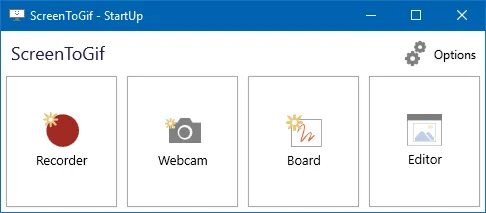
ScreenToGif is a different app: MS-PL, GitHub, winget id NickeManarin.ScreenToGif. It records a selected area, a webcam, or a sketchboard, then edits on the PC. This guide is the move: keep finished gifs as files, then capture new clips locally.
Related: guides, gif maker, download safely, install on Windows.
There is no browser project importer
The ScreenToGif README does not document an import from EZGIF, other in-browser encoders, or a random web “gif maker” site. There is no converter to invent. Migration copy is: export nothing as a project. Download the gif or video the browser already made. Open ScreenToGif after install. Record the live window if that is the real job.
Do not paste a browser encoder URL into ScreenToGif. Do not expect cloud jobs to sync. The README does not describe an account.
Phone screen recordings are a sibling case. Copy the video to the Windows PC. Current release notes mention exporting and importing videos with FFmpeg 7 and newer. Point the app at FFmpeg first: FFmpeg guide. Do not invent a phone ScreenToGif app. The README does not list an Android installer.
Re-record the live window
Browser tools win when the file already exists. A gif maker wins when the window is on the PC in front of you: a bug, a setting, a sketch, a talking-head take. Install, then pick screen, webcam, or sketchboard.
winget install -e --id NickeManarin.ScreenToGifRecord a small region. Stop. Trim in the editor. Export a gif to a folder you named. Webcam: webcam guide. Record walkthrough: record on Windows. Export: export gif, apng, video. Resize later: gif resizer. Convert a file you already have: gif converter. From scratch: make a gif.
What moves and what stays
| Item | Browser encoder | ScreenToGif on Windows |
|---|---|---|
| Job | Encode a file already in a tab | Record a live screen, webcam, or board |
| Where it runs | Browser | Windows app |
| Account | Whatever that site asks | None in the README |
| Existing gif | Download it | Keep the file, no project import |
| New clip of a window | Upload or capture extension | Record locally |
| Editor | Whatever the site ships | Integrated editor |
| Export gif, apng, video | Site-dependent | README names gif, apng, video, psd, png |
| FFmpeg | Not this app | For video export and import |
| Install | None | Winget or GitHub MSI/zip |
| Extra unsigned exe | Ignore those too | Stop them after one official install |
ShareX and LICEcap are other Windows capture tools, not browser encoders: vs ShareX, vs LICEcap.
Extra unsigned gif-maker exes
People also drop random gif-maker exes on Desktop from search ads. Stop those. Install once from winget or GitHub. Keep one official ScreenToGif copy. Safe path: download a gif maker safely. Safety notes: is this gif maker safe. Releases: gif maker releases. GitHub: open source gif maker on GitHub.
Skip Softonic, CNET, and countdown wrappers. Match ScreenToGif.*.Setup.x64.msi or the portable zip, or the winget id NickeManarin.ScreenToGif.
After the first local recording
.NET 9 Desktop Runtime or above must be present: Microsoft runtime. App Installer for winget: Microsoft App Installer. Portable versus setup: portable or setup. Light versus full: light or full. Windows cluster: open source gif maker on Windows. This computer: gif maker for this computer. About: about. Product home: screentogif.com. License: MS-PL. Issues: ScreenToGif issues. Wiki: ScreenToGif wiki.
A Store listing 9N3SQK8PDS8G exists as a supporting path. Chocolatey package screentogif is supporting too. Pick one door.
When the browser tool should stay
Keep EZGIF or another encoder when the job is already a downloaded video you only need to crop, when you are on a locked-down PC that cannot install apps, or when you do not need a live recorder. Be honest about that split. These notes do not pretend a Windows gif maker is the only way to make a gif.
When the job is a live window you control, leave the tab. Record on the PC. Exports stay in the folder you choose. No login. README asks people not to sell ScreenToGif as theirs. Stay on NickeManarin/ScreenToGif for the bytes.
Switch steps:
- Save finished gifs from the browser encoder to a folder on the PC. There is no project importer.
- Run the official winget command or take the x64 setup MSI from GitHub Releases.
- Pick screen, webcam, or sketchboard and capture the clip that used to require an upload.
- Keep one official ScreenToGif install and stop using random gif-maker exes from Desktop.
Runtime and extra copies
Take the full setup MSI or winget so .NET 9 Desktop Runtime is already in the payload. Light files expect the runtime on the PC. Safe download: download a gif maker safely. Releases: gif maker releases. Source: gif maker on GitHub.
Keep one official copy after you leave the browser tab. Extra unsigned gif-maker exes are not a migration path. Skip Softonic. Current release notes mention FFmpeg 7 for video import and export if a phone file is part of the move.
Frequently asked questions
Can I import EZGIF projects into this gif maker?
No. The ScreenToGif README does not document an import from EZGIF or other in-browser encoders. Download the gif you already made, then record new clips in ScreenToGif. Compare: vs EZGIF.
How do I switch from a browser gif tool?
Save any gif you still need from the browser tool, install ScreenToGif with winget id NickeManarin.ScreenToGif, then record the live window on Windows. Guide: install on Windows.
Can I open a phone screen recording in this gif maker?
Copy the video to the Windows PC first. Current release notes mention exporting and importing videos with FFmpeg 7 and newer. Point the app at FFmpeg, then open the file. Do not invent a phone app. FFmpeg: FFmpeg guide.
Should I keep using EZGIF after I install a gif maker?
Keep a browser encoder when the job is already a file in a tab and you do not need a live recorder. Use ScreenToGif when the job is a window, a webcam, or a sketchboard on the PC. Split by job: vs EZGIF.
Where do I install the gif maker after I leave the browser?
Use GitHub Releases or winget id NickeManarin.ScreenToGif. Skip Softonic, CNET, and extra Desktop exes. Related: download a gif maker safely and gif maker versus EZGIF.